# Next Gen eSports - Complete Wix + Velo Implementation Guide
## Overview
This guide provides complete implementation for rebuilding nextgenesports.in on Wix with rentkar.app-inspired design and black/white/true blue color scheme.
---
## PHASE 1: WIX DATABASE SETUP
### Collection 1: `PlayStationRentals`
**Fields:**
- `title` (Text) - e.g., "PlayStation 5 Rent 1 Month"
- `description` (Rich Text)
- `price` (Number)
- `priceUnit` (Text) - "per day", "per week", "per month"
- `console` (Text) - "PS4" or "PS5"
- `duration` (Text) - "1 Day", "3 Days", "1 Week", "1 Month"
- `controllersIncluded` (Number) - Default: 2
- `image` (Image)
- `featured` (Boolean)
- `available` (Boolean)
- `gamesAvailable` (Array - Text) - List of game titles
- `pincodes` (Array - Text) - Service areas
- `slug` (Text) - URL-friendly name
**Sample Data:**
```
Title: PlayStation 5 Rent 1 Month
Price: 6999
Console: PS5
Duration: 1 Month
Games Available: [Assassins Creed Unity, Call of Duty Modern Warfare, God of War Ragnarok, GTA V, Spider Man 2, Tekken 8, Black Myth Wukong, FC 25, etc.]
Pincodes: [401201, 401202, 401203, 401207, 401208, 401209, 401301, 401302, 401303, 401304, 401305]
```
---
### Collection 2: `Games`
**Fields:**
- `title` (Text)
- `description` (Rich Text)
- `price` (Number) - Purchase price
- `console` (Text) - "PS4", "PS5", "Both"
- `category` (Text) - "PlayStation 4 Games", "PlayStation 5 Games"
- `genre` (Text) - "Action", "Sports", "Racing", "Story", etc.
- `image` (Image)
- `stock` (Number)
- `ribbon` (Text) - "New Arrival", "Rare", "Steel book edition"
- `featured` (Boolean)
- `multiplayerSupported` (Boolean)
- `slug` (Text)
---
### Collection 3: `BookingServices`
**Fields:**
- `serviceName` (Text)
- `price` (Number)
- `description` (Rich Text)
- `image` (Image)
- `duration` (Text) - "Per Session", "Hourly"
- `featured` (Boolean)
- `slug` (Text)
**Sample Data:**
```
PS4 Gaming Session - From ₹80
PlayStation 5 Gaming Session - From ₹70
Simulator with Cockpit Logitech G29 - From ₹100
PlayStation VR - From ₹100
```
---
### Collection 4: `CustomControllers`
**Fields:**
- `title` (Text)
- `description` (Rich Text)
- `price` (Number)
- `optionType` (Text) - "Left", "Right", "Both"
- `image` (Image)
- `pincodes` (Array - Text)
- `featured` (Boolean)
---
### Collection 5: `Bookings` (For customer orders)
**Fields:**
- `customerName` (Text)
- `customerEmail` (Text)
- `customerPhone` (Text)
- `serviceType` (Text) - "Rental", "Gaming Session", "Purchase"
- `productId` (Reference - to relevant collection)
- `selectedGame` (Text)
- `pincode` (Text)
- `startDate` (Date)
- `endDate` (Date)
- `totalAmount` (Number)
- `status` (Text) - "Pending", "Confirmed", "Delivered", "Completed", "Cancelled"
- `bookingDate` (Date & Time)
- `additionalNotes` (Text)
---
## PHASE 2: GLOBAL CSS STYLING
**Add to: Site Settings → Custom Code → Header (for CSS)**
```html
```
# Next Gen eSports - Wix Page Structure Guide
## Complete List of Pages to Create in Wix
---
## 1. HOME PAGE (/)
### Sections to Add:
#### **Header (Sticky)**
- Logo: Image or text "Next Gen eSports 2.0"
- Navigation Menu: Categories | Rentals | Games | Booking | About | Contact
- Search Bar (with search icon)
- Cart Icon (with count badge)
- Mobile Menu Button (hamburger icon)
#### **Hero Section**
- Background: Full-width image (gaming arena/esports)
- Overlay: Black gradient (90% to 40% transparency)
- Heading: "Experience the Future of Gaming!"
- Subheading: "Rent, Play, Compete & Conquer!"
- CTA Buttons: "Browse Rentals" | "Book a Session"
- Stats Bar: 400+ Games | 50+ Products | 11 Locations Served
#### **Featured Services (3 Cards)**
1. PlayStation Rentals
2. Gaming Sessions
3. Buy Pre-owned Games
#### **PlayStation Rentals Section**
- Section Title: "PlayStation Rentals"
- Repeater (#rentalRepeater) with 4 items showing:
- PS5/PS4 Image
- Title (e.g., "PlayStation 5 Rent 1 Month")
- Price (₹6999)
- Duration badge
- "Rent Now" button
- "2 Controllers Included" text
#### **Featured Games Section**
- Section Title: "New Releases & Popular Games"
- Repeater (#gamesRepeater) with 8 items showing:
- Game cover image
- Game title
- Console badge (PS4/PS5)
- Price
- Stock status badge
- "View Details" button
#### **How It Works Section (Dark Background)**
- Background: Black (#000000)
- 4 Step Cards:
1. Browse & Select
2. Choose Dates/Book
3. Get Delivered
4. Game On!
- Each card has icon, title, description
#### **Why Choose Us Section**
- 4 Feature Cards:
1. Verified Equipment
2. Fast Delivery
3. Flexible Payment
4. 24/7 Support
#### **Footer (Black Background)**
- 4 Columns:
1. Brand Logo + Description + Social Icons
2. Quick Links
3. Support Links
4. Newsletter Signup
- Bottom: Contact info (Phone, Email, Address)
- Copyright: "© 2026 Next Gen eSports. All rights reserved."
---
## 2. PLAYSTATION RENTALS PAGE (/playstation-rentals)
### Elements:
- Page Title: "PlayStation Rentals"
- Filters Section:
- Console Filter: Dropdown (All | PS4 | PS5)
- Duration Filter: Dropdown (All | 1 Day | 3 Days | 1 Week | 1 Month)
- Pincode Filter: Text Input + "Check" Button
- Sort: Dropdown (Price: Low to High | High to Low | Console)
- Clear Filters Button
- Results Section:
- Result Count Text (#resultCount)
- Loading Indicator (#loadingIndicator)
- Rentals Repeater (#rentalsRepeater)
- Each item: Image, Title, Console, Duration, Price, Controllers Info, "Rent Now" button
---
## 3. RENTAL DETAILS PAGE (/rental-details)
### Elements:
- Left Column:
- Large product image
- Image gallery (if multiple images)
- Right Column:
- Product Title
- Console Badge
- Duration Badge
- Price (large text)
- Description (rich text)
- Controllers Included info
- Available Games List
- Booking Form:
- Game Selection Dropdown (#gameSelector)
- Pincode Selection Dropdown (#pincodeSelector)
- Customer Name (#customerName)
- Customer Email (#customerEmail)
- Customer Phone (#customerPhone)
- Start Date (#startDate)
- Additional Notes (textarea)
- "Rent Now" Button
- Error Message (#errorMessage)
- Additional Options:
- Extra Controller Checkbox
- Multiple Games Checkbox
- Contact Buttons:
- WhatsApp Button
- Call Button
---
## 4. GAMES PAGE (/games)
### Elements:
- Page Title: "PlayStation Games"
- Category Tabs: All | PS4 Games | PS5 Games
- Filters Section:
- Console: Dropdown (All | PS4 | PS5 | Both)
- Genre: Dropdown (All | Action | Sports | Racing | Story | RPG)
- Price Range: Dropdown (All | Under ₹1000 | ₹1000-₹2000 | Above ₹2000)
- Stock: Dropdown (All | In Stock | Out of Stock)
- Sort: Dropdown (Newest | Price: Low to High | High to Low | Name A-Z)
- Search: Text Input + Button
- Results Section:
- Result Count (#resultCount)
- Games Grid Repeater (#gamesRepeater)
- Each item: Image, Title, Console, Price, Stock Badge, Ribbon (if any), "View Details" + "Buy Now" buttons
---
## 5. GAME DETAILS PAGE (/game-details)
### Elements:
- Game Image (large)
- Game Title
- Console Badge
- Price
- Stock Status
- Description
- Genre
- Ribbon/Special Badge (if applicable)
- Multiplayer Badge (if supported)
- Purchase Buttons:
- "Buy Now" Button
- "Add to Cart" Button
- Success Message (#cartMessage)
- Similar Games Section:
- Repeater showing 4 similar games
- Contact Section:
- "Contact for Purchase" heading
- WhatsApp Button
- Call Button
---
## 6. BOOKING SERVICES PAGE (/booking)
### Elements:
- Page Title: "Book Gaming Sessions"
- Subtitle: "Play, Compete & Conquer!"
- Services Repeater (#servicesRepeater):
Each service card shows:
- Service Image
- Service Name (e.g., "PS4 Gaming Session")
- Description
- Price ("From ₹80")
- Duration info
- "Book Now" Button
**Available Services:**
1. PS4 Gaming Session - From ₹80
2. PlayStation 5 Gaming Session - From ₹70
3. Simulator with Cockpit Logitech G29 - From ₹100
4. PlayStation VR - From ₹100
- Booking Form Section (#bookingFormSection):
- Selected Service Display
- Date Picker (#bookingDate)
- Time Slot Dropdown (#timeSlot)
- Duration Selector (#durationHours)
- Availability Message (#availabilityMessage)
- Price Breakdown (#priceBreakdown)
- Total Amount (#totalAmount)
- Customer Details:
- Name (#customerName)
- Email (#customerEmail)
- Phone (#customerPhone)
- Additional Notes (#additionalNotes)
- "Confirm Booking" Button
- Error Message (#errorMessage)
- Contact Options:
- WhatsApp Button
- Call Button
---
## 7. CUSTOM CONTROLLERS PAGE (/custom-controllers)
### Elements:
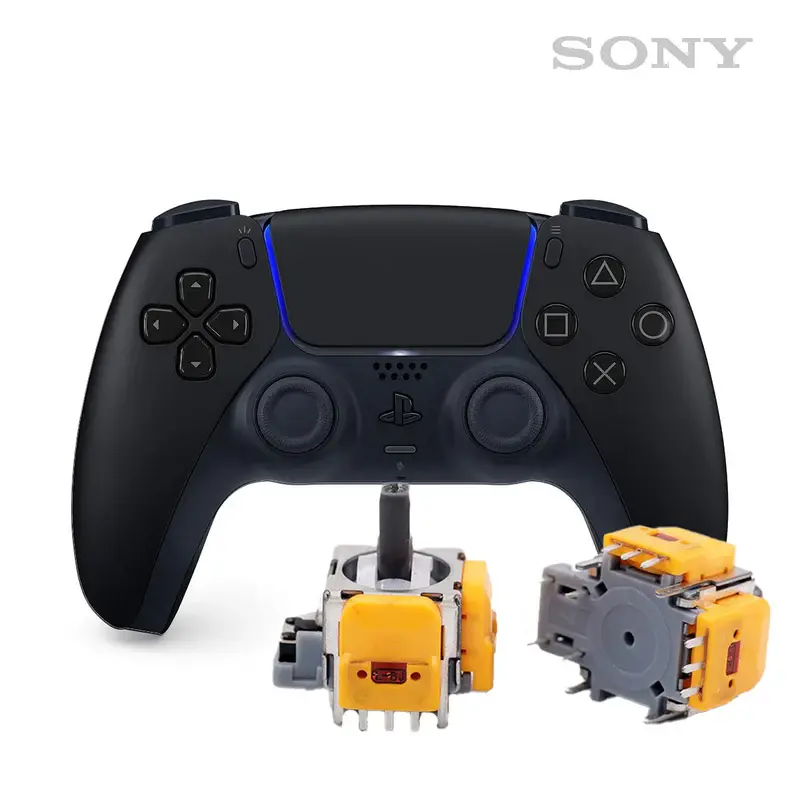
- Page Title: "Hall Effect Analog Controllers"
- Description: What is Hall Effect technology
- Product Card:
- Product Image
- Title: "Hall Effect Analog Right/Left side only"
- Price: ₹1500
- Description
- "New Arrival" Badge
- Order Form:
- Option Selection: Left | Right | Both
- Pincode Selection
- Customer Details
- "Order Now" Button
---
## 8. CHECKOUT PAGE (/checkout)
### Elements:
- Order Summary:
- Product Image
- Product Title
- Quantity
- Price
- Customer Information Form:
- Full Name
- Email
- Phone Number
- Shipping Address
- City
- State
- Pincode
- Payment Method Selection:
- COD (Cash on Delivery)
- Online Payment (coming soon)
- Order Total:
- Subtotal
- Shipping (if applicable)
- Total Amount
- "Place Order" Button
- Error Message Display
---
## 9. BOOKING/ORDER CONFIRMATION PAGE (/booking-confirmation, /order-confirmation)
### Elements:
- Success Icon/Animation
- Confirmation Number (#confirmationNumber)
- "Thank You" Message
- Booking/Order Details:
- Customer Name
- Service/Product Name
- Date & Time (for bookings)
- Duration (for bookings)
- Total Amount
- Status
- Contact Information:
- Email
- Phone
- Next Steps Instructions
- "Track Order" Button (future feature)
- "Back to Home" Button
---
## 10. ABOUT PAGE (/about)
### Elements:
- Hero Image
- About Section:
- "About Next Gen eSports"
- Mission Statement
- What we offer
- Image with Gaming Scene
- Game Collection Info: "400+ Games"
- Features Grid:
- PlayStation on Rent
- Repair & Damage-free Console
- 24x7 Services
- Assured & Verified
- Team Section (optional)
- Values/Principles
---
## 11. CONTACT PAGE (/contact)
### Elements:
- Page Title: "Get In Touch"
- Contact Information:
- Phone: +91 7738483030 / +91 7738454848
- Email: support@nextgenesports.in
- Address: Mumbai, Maharashtra
- Service Pincodes List
- Contact Form:
- Name
- Email
- Phone
- Subject
- Message
- "Send Message" Button
- Map (Google Maps embed)
- Social Media Links:
- Instagram
- Facebook
- YouTube
- Twitter
---
## 12. SEARCH RESULTS PAGE (/search)
### Elements:
- Search Query Display
- Filter Options (similar to Games/Rentals pages)
- Results Tabs: All | Rentals | Games | Services
- Results Repeater (unified for all types)
- "No Results" Message
---
## ELEMENT ID NAMING CONVENTION
### Repeaters:
- `#rentalRepeater` - PlayStation rentals
- `#gamesRepeater` - Games listing
- `#servicesRepeater` - Booking services
- `#similarGamesRepeater` - Similar games
### Within Repeaters (prepend item ID):
- `#rentalCard`, `#gameCard`, `#serviceCard`
- `#rentalImage`, `#gameImage`, `#serviceImage`
- `#rentalTitle`, `#gameTitle`, `#serviceName`
- `#rentNowBtn`, `#buyNowBtn`, `#bookServiceBtn`
### Form Inputs:
- `#searchInput`
- `#customerName`, `#customerEmail`, `#customerPhone`
- `#bookingDate`, `#timeSlot`, `#durationHours`
- `#gameSelector`, `#pincodeSelector`
- `#additionalNotes`
### Buttons:
- `#searchBtn`, `#checkPincodeBtn`, `#clearFiltersBtn`
- `#confirmBookingBtn`, `#placeOrderBtn`
- `#contactWhatsAppBtn`, `#contactCallBtn`
### Messages/Status:
- `#errorMessage`, `#successMessage`
- `#availabilityMessage`, `#pincodeMessage`
- `#resultCount`, `#loadingIndicator`
### Filters:
- `#consoleFilter`, `#genreFilter`, `#priceRangeFilter`
- `#durationFilter`, `#stockFilter`, `#sortFilter`
---
## COLOR SCHEME TO USE IN WIX EDITOR
**Primary Colors:**
- **True Blue**: #0047AB (Primary buttons, links, accents)
- **Black**: #000000 (Hero sections, footer, dark sections)
- **White**: #FFFFFF (Main background, text on dark backgrounds)
**Secondary Colors:**
- **Gray Light**: #F5F5F5 (Card backgrounds, input fields)
- **Gray Medium**: #666666 (Secondary text)
- **Gray Dark**: #1A1A1A (Dark cards)
**Accent Colors:**
- **Border**: #E5E5E5
- **Success Green**: #10B981 (for available/in stock)
- **Error Red**: #DC2626 (for out of stock/errors)
- **Warning Yellow**: #FFD700 (for rare items)
---
## FONTS
**Headings**:
- Font: Helvetica Neue Bold / Arial Bold
- Weights: 700 (Bold), 600 (Semibold)
**Body Text**:
- Font: Helvetica Neue / Arial
- Weights: 400 (Regular), 500 (Medium)
**Sizes**:
- H1: 48px (Mobile: 32px)
- H2: 36px (Mobile: 28px)
- H3: 28px (Mobile: 24px)
- Body: 16px
- Small: 14px
---
## RESPONSIVE BREAKPOINTS
- **Desktop**: 1200px+
- **Tablet**: 768px - 1199px
- **Mobile**: < 768px
Hide desktop navigation on mobile, show hamburger menu.
Stack cards vertically on mobile.
Full-width buttons on mobile.
---
This structure ensures your Wix site will match the functionality and look of your current site while using the black/white/true blue theme!
top of page
A Hall effect controller is a type of game controller or joystick that uses magnetic sensors instead of traditional mechanical parts to detect movement. It’s a game-changer—literally—for precision and durability. Here's how it works and why it's gaining popularity:
🧲 What Is the Hall Effect?
The Hall effect is a physical phenomenon discovered in 1879 by Edwin Hall.
When an electric current flows through a conductor and a magnetic field is applied perpendicular to it, a voltage is generated across the conductor—this is the Hall voltage.
This voltage can be measured to determine position or movement without physical contact.
Hall Effect Analog Right/Left side only Service available on below Pincode only*
bottom of page